Repair missing parent links
Inbox identifies missing parent properties and parent links that cannot be resolved.
How to use it
Section titled “How to use it”A parent link tells Tasks Eye how a note relates to the rest of your work. For example, a meeting note can link to Work even if the files live in different folders.
Inbox distinguishes a missing up property from a link that cannot be resolved,
so you can add a parent or correct the existing link.
How to fix
Section titled “How to fix”Read the message on the row, then follow the matching steps. Fixing the parent link clears that warning; other issues may keep the note in Inbox.
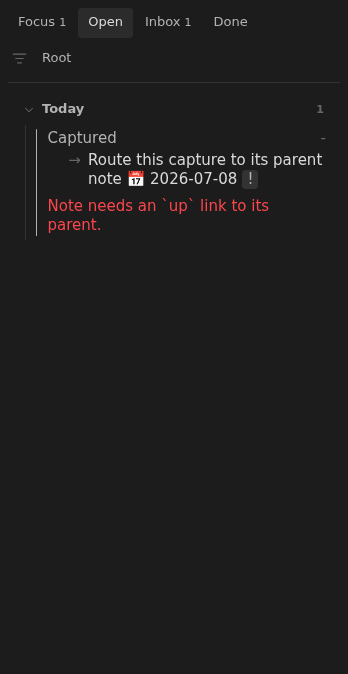
“Note needs an up link to its parent.”
Section titled ““Note needs an up link to its parent.””Add an up property at the start of the note, inside its YAML frontmatter.
For example, if Projects is its parent:
---up: "[[Projects]]"status: open---Use a wikilink, not a bare note name. Obsidian resolves the link from the source
note, so a folder-qualified link such as [[Areas/Projects]] can identify a
parent when several notes share a name. An alias such as
[[Projects|My projects]] also works.
“up link points to a note that doesn’t exist.”
Section titled ““up link points to a note that doesn’t exist.””Check the property for a typo, a deleted parent, or a value that is not a
wikilink. Correct the link or create the missing parent. For example, replace
[[Projcts]] with:
---up: "[[Projects]]"status: open---The parent can be elsewhere in your vault, including outside the notes folder or inside an excluded folder. An existing parent outside the indexed notes acts as an external root. It does not need to be moved into the notes folder. See Sources for how this affects context.
Create a root when starting a new tree
Section titled “Create a root when starting a new tree”For a tree contained in your notes folder, choose one root note and give it
up: "-". Other notes link to that root or one of its descendants.
A root used only for organization can be closed:
---status: closedup: "-"---The quoted hyphen is a literal value, not a wikilink. Only one indexed note may declare it. If more than one does, follow Repair tree structure.
A root is otherwise an ordinary note. If you make it open, give it an unchecked task with a due date, just as you would any other active note.
Rules and details
Section titled “Rules and details”- A note without an
upproperty reports: Note needs anuplink to its parent. - A note whose
uplink does not resolve reportsuplink points to a note that doesn’t exist. - A valid root declares
up: "-"and needs no parent link. - Broken parent links do not prevent otherwise valid notes from appearing in Open.
Example note to repair
Section titled “Example note to repair”This example illustrates the issue. Replace its dates and parent links with ones that fit your vault.
---status: open---
- [ ] Route this capture to its parent note 📅 2026-07-08
What it looks like
Section titled “What it looks like”Note without an up link
Section titled “Note without an up link”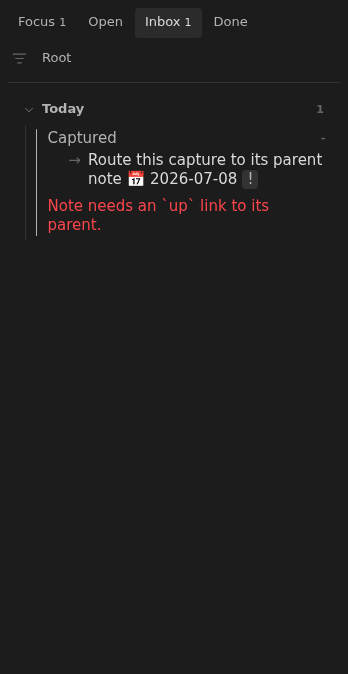
Broken note in Open
Section titled “Broken note in Open”