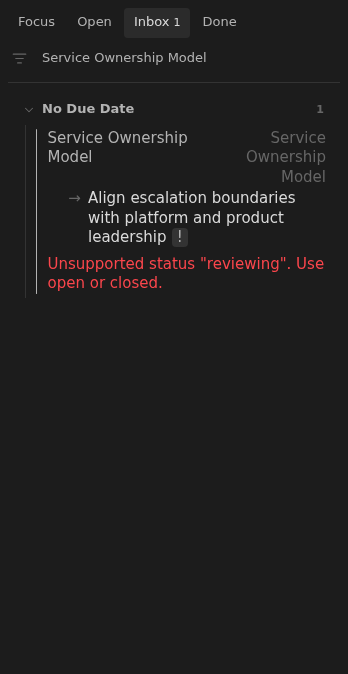
Unsupported status
A note needs open or closed when it declares a status.
How to use it
Section titled “How to use it”Status controls which workflow a note belongs to. A typo like waiting should
not silently remove the note from the expected board.
Inbox reports unsupported explicit statuses while still allowing missing or blank status to use the documented Open default.
How to fix
Section titled “How to fix”Set the note’s status property to open or closed. For active work:
status: openChange the existing property inside the note’s frontmatter. Removing it, or leaving it blank, also makes the note behave as open. Use closed for retained reference or finished work with no unchecked tasks.
Rules and details
Section titled “Rules and details”- Explicit unsupported status values are reported in Inbox.
- Non-string status values are reported in Inbox.
- Missing or blank status does not trigger this issue because it defaults to Open.
Example note to repair
Section titled “Example note to repair”This example illustrates the issue. Replace its dates and parent links with ones that fit your vault.
---status: reviewingup: "[[Root]]"---
# Service Ownership Model
- [ ] Align escalation boundaries with platform and product leadership
What it looks like
Section titled “What it looks like”Unsupported workflow status
Section titled “Unsupported workflow status”