Sources
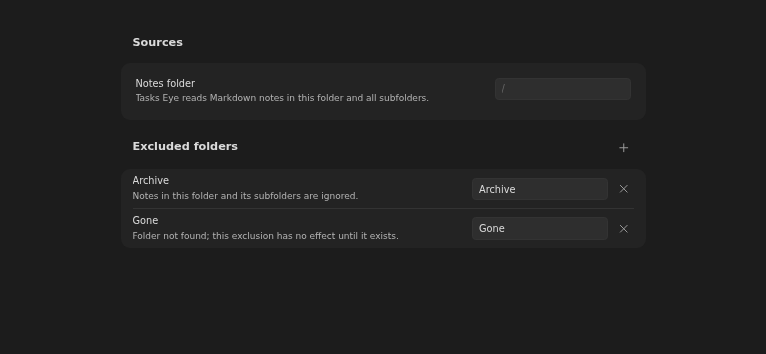
Choose which vault folders Tasks Eye reads: one notes folder plus optional excluded subfolders.
How to use it
Section titled “How to use it”Open Settings → Tasks Eye → Sources. Set Notes folder to the folder
containing your work notes. The default, /, includes the whole vault.
Use Excluded folders to leave out archives, templates, or imported notes.
An exclusion covers the chosen folder and all its subfolders. For example,
excluding Tasks/Archive still allows notes in Tasks/Archive 2026.
Excluded notes are absent from all views and validation. Changing these settings refreshes the boards.
Parents outside the notes folder
Section titled “Parents outside the notes folder”A parent link can point to an existing note outside the included folders, including an excluded note. Tasks Eye treats that parent as an external root: it stops following the chain there. The indexed note directly beneath it becomes the context for its own descendants.
For example, if Home is outside the included folders but Work and Meeting are inside, the chain Home → Work → Meeting gives Meeting the Work context. The external Home note is not added to the boards.
For a simple self-contained setup, keep a single root and its branches inside the notes folder, as shown in the getting-started example.
Rules and details
Section titled “Rules and details”- The notes folder is configurable in the Sources settings section and defaults to the vault root (
/). - Tasks Eye reads Markdown notes directly inside the notes folder and all descendants.
- A missing notes folder produces an explicit configuration error.
- Any number of excluded folders can be added and removed in settings.
- Notes inside an excluded folder or any of its subfolders are not indexed, validated, or shown.
- A note whose
upparent is excluded is treated like a note whose parent is outside the notes folder: the parent acts as an external tree root. - Exclusion matches whole folder names: excluding
ArchivekeepsArchive 2026. - Excluding subfolders works with the vault root as the notes folder.
- An exclusion outside the notes folder is accepted and has no effect.
- An exclusion that equals or contains the notes folder is rejected, and so is moving the notes folder inside an excluded folder.
- An excluded folder that no longer exists shows a non-blocking warning.
- Boards refresh when exclusions change or notes move into or out of an excluded folder.
What it looks like
Section titled “What it looks like”Sources settings
Section titled “Sources settings”