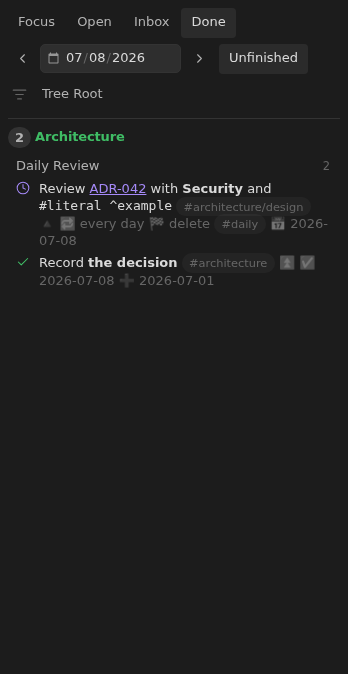
Muted task configuration
Keep task descriptions prominent while configuration stays visible but muted in every view.
How to use it
Section titled “How to use it”Dates, recurrence rules, priorities, and identifiers help manage a task, but they should not compete with the words describing the work. Tasks Eye keeps that configuration inline and readable while giving the description more visual emphasis. Configuration text uses the same faint color as day labels, with grayscale emojis dimmed further.
Descriptions are assumed to contain no emojis. Everything from the first emoji onward is treated as configuration for display, without interpreting its values. Tags and trailing block IDs are muted separately. Dataview-style fields are outside this presentation rule.
Done uses the same presentation instead of deleting configuration from its task labels, so completion dates and other details remain available.
Rules and details
Section titled “Rules and details”- Text from the first emoji onward is muted, including priority, recurrence, completion rules, dates, and task identifiers.
- Configuration text uses the same faint color as day labels.
- Configuration emojis are grayscale and dimmed alongside their values.
- Tags and visible trailing block IDs are muted even without an emoji.
- Done keeps the original task text, including its completion date, rather than removing configuration.
- Markdown formatting, links, task controls, and source notes are preserved.
- Dataview-style configuration fields are not recognized for dimming.
What it looks like
Section titled “What it looks like”Muted configuration in Focus
Section titled “Muted configuration in Focus”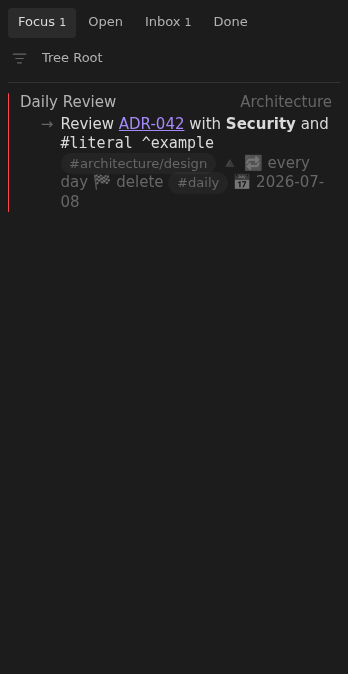
Muted configuration in Open
Section titled “Muted configuration in Open”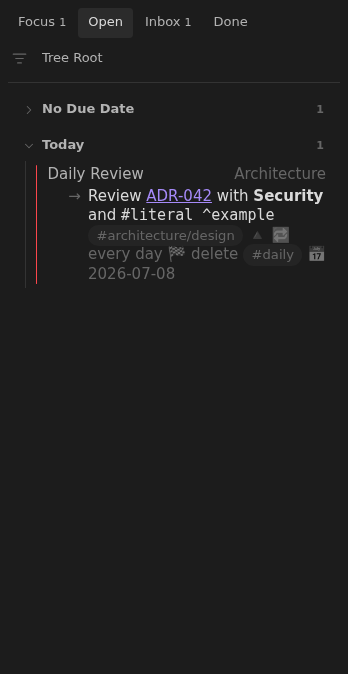
Muted configuration in Inbox
Section titled “Muted configuration in Inbox”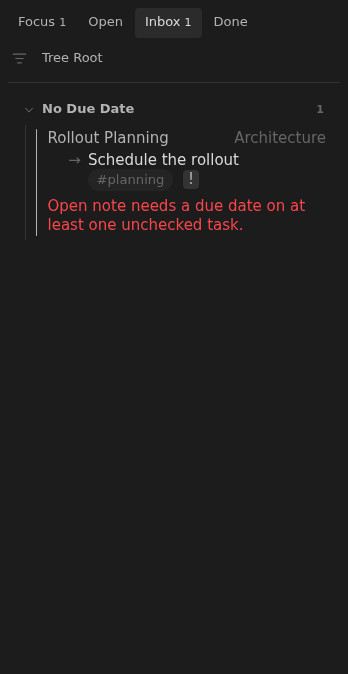
Muted configuration in Done
Section titled “Muted configuration in Done”