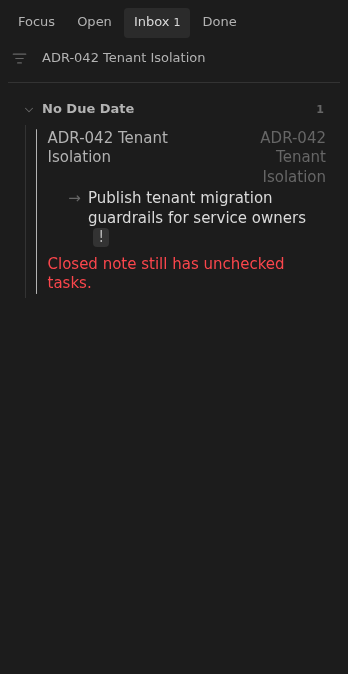
Closed note with unchecked tasks
A note with status: closed is inconsistent when it still contains unchecked tasks.
How to use it
Section titled “How to use it”Closed means the note should no longer carry active work. If unchecked tasks remain, the note is ambiguous: either the status is wrong, or the work needs to be completed or moved.
Inbox makes that mismatch visible so the user can clean up the note before the task disappears from active planning.
How to fix
Section titled “How to fix”Decide whether work remains. If it does, set status: open and give at least
one unchecked task a due date. If the note is finished, complete, remove, or move
the remaining unchecked tasks as appropriate.
Changing the note’s status does not change any checkboxes.
Rules and details
Section titled “Rules and details”status: closednotes with unchecked tasks are reported in Inbox.- Closed notes with only completed tasks do not trigger this issue.
- The issue text is
Closed note still has unchecked tasks.
Example note to repair
Section titled “Example note to repair”This example illustrates the issue. Replace its dates and parent links with ones that fit your vault.
---status: closedup: "[[Root]]"---
# ADR-042: Tenant Isolation
- [ ] Publish tenant migration guardrails for service owners
What it looks like
Section titled “What it looks like”Closed ADR with an open follow-up
Section titled “Closed ADR with an open follow-up”