Inbox view
Inbox shows notes needing attention: missing information, overdue work, availability conflicts, or inconsistent task and note status.
How to use it
Section titled “How to use it”Focus and Open are trustworthy only when every active note has a clear next action. Inbox collects the exceptions in one issue list, so fixing a missing date, overdue action, or unfinished note does not get mixed up with choosing today’s work.
Inbox checks every workflow state. A closed note with unchecked work still needs a decision, and an unsupported status should not make a note silently disappear. Once the note is repaired, it returns to the view that matches its state.
The issue list uses the same note-first rows and due-date buckets as Open, so switching views does not introduce another row layout. Inbox keeps all of its buckets expanded by default and adds the validation message that explains what needs to be repaired.
Rules and details
Section titled “Rules and details”- Inbox shows notes with validation issues.
- Inbox includes notes with issues whether their status is open, closed, or unsupported.
- Like Open, Inbox shows one row per note, grouped by due date.
- Every Inbox bucket starts expanded so validation issues are immediately visible.
- Inbox rows keep their validation messages, note links, context badges, and row actions.
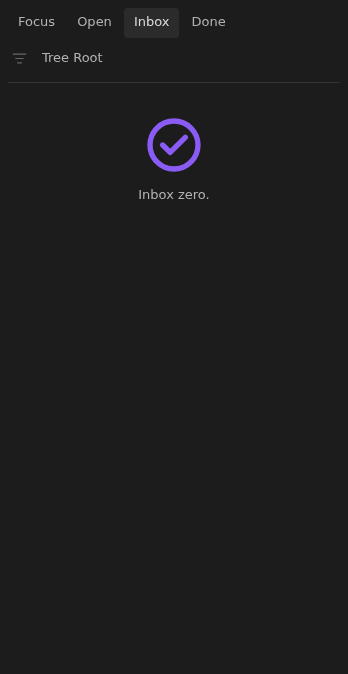
- Inbox celebrates an all-clear state with
Inbox zero.and a large check icon when no notes need attention.
What it looks like
Section titled “What it looks like”An issue list with clear next steps
Section titled “An issue list with clear next steps”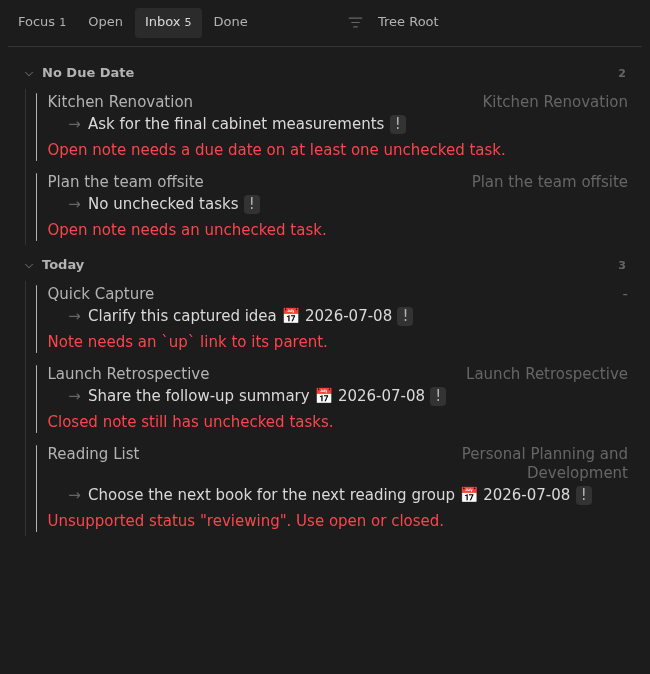
A healthy inbox
Section titled “A healthy inbox”