Notes and task conventions
Tasks Eye reads status, up tree properties, and Obsidian Tasks emoji metadata from ordinary Markdown notes.
How to use it
Section titled “How to use it”Put note properties in YAML frontmatter at the start of the file. Keep tasks beside the notes, links, and decisions they belong to.
Give the note a parent and status
Section titled “Give the note a parent and status”For example, a note under an existing Work branch can begin with:
---status: openup: "[[Work]]"---Use open for active work and closed for finished work or reference. Missing
or blank status is treated as open. An open note needs an unchecked task and a
due date on at least one unchecked task; a closed note must have no unchecked
tasks.
A simple tree has one root with up: "-". Its direct children are contexts,
such as Work and Personal. Deeper notes inherit that context. Folders determine
which notes are read; parent links determine their context. See
Sources for exclusions and parents outside that scope.
Date the next action
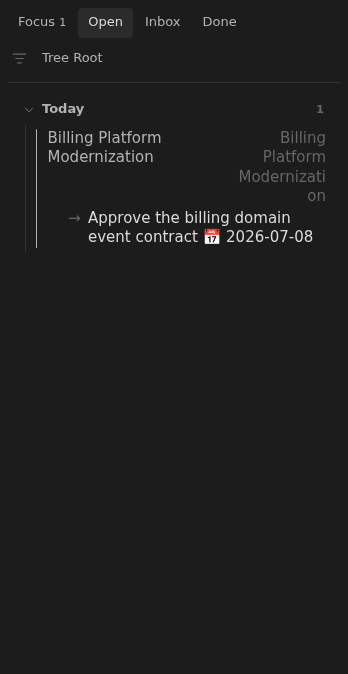
Section titled “Date the next action”- [ ] Draft the meeting agenda 📅 2026-10-01- [ ] Send the agenda to attendeesReplace the date with the day you want to revisit the action. Tasks Eye reads
the 📅 due marker; scheduled and start dates do not select a board date.
It chooses the unchecked task with the earliest due date. Ties keep the tasks’
order in the note; without any due dates it shows the first unchecked task.
Completion dates such as ✅ 2026-10-01 place completed tasks in Done.
Task priority markers affect ordering between notes whose next actions share
a date.
Tasks Eye reads task-shaped lines throughout a note, including inside fenced code blocks. Keep literal checkbox examples outside your notes folder or write them inline if they should not become tasks.
Rules and details
Section titled “Rules and details”- For a tree entirely inside the notes folder, one root declares
up: "-"and the other notes link to their parents. Existing parents outside the included folders are also supported. - Context follows the
uptree rather than the note’s folder. - Supported note statuses are
openandclosed. - Missing or blank status is treated as
open. - Tasks Eye reads
📅 YYYY-MM-DDdue dates and✅ YYYY-MM-DDcompletion dates. Scheduled and start markers do not control board dates.
What it looks like
Section titled “What it looks like”Note row
Section titled “Note row”