Done view
Review tasks completed on a chosen day, grouped by context and note. Optionally include dated unfinished tasks from those same notes.
How to use it
Section titled “How to use it”Completed work is useful after the checkbox changes. Done gives that history a
focused view where the user can review a day, switch dates, and see the work
grouped by the same contexts used on the boards without opening another view.
Those contexts come from each note’s first-level ancestor in the explicit up
tree, not from its vault folder.
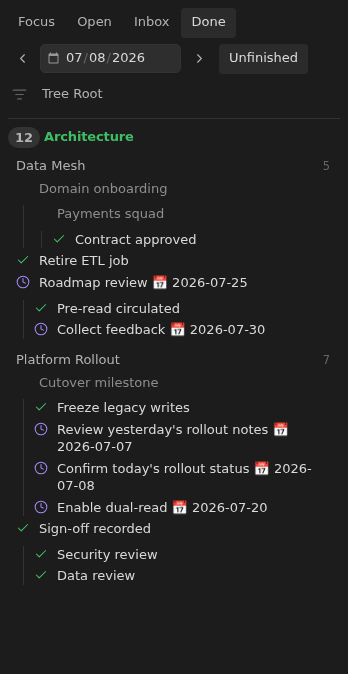
The view reads completion dates from Tasks metadata so it does not need a separate history log. An “Unfinished” toggle extends the day’s history with any unfinished task that carries a due date, whether that date is past, today, or future. It only includes those tasks inside notes that also completed a task on the selected day, so the view stays a focused overview of what happened and what still needs attention in the notes you touched. Task indentation preserves subtask nesting. Parent tasks remain visible as context even when only a child matches the selected day.
Rules and details
Section titled “Rules and details”- Done is the fourth board tab, after Focus, Open, and Inbox.
- Completed tasks are selected by Tasks completion date.
- An ‘Unfinished’ toggle adds every unfinished task with a due date, but only inside notes that also have a task completed on the selected day.
- Subtask nesting is preserved; ancestors of a matching task appear as muted context rows without a completion check.
- Tasks are grouped by the first-level ancestor in the
uptree and note name. - The date picker and previous/next/today controls change the reviewed date.
- The context filter narrows completed tasks the same way it narrows board rows.
What it looks like
Section titled “What it looks like”Done view
Section titled “Done view”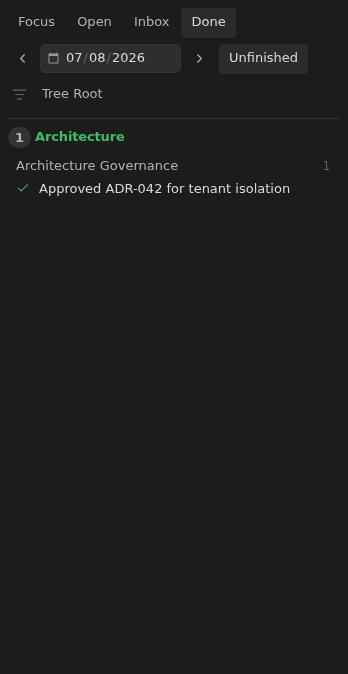
Done with unfinished tasks and nesting
Section titled “Done with unfinished tasks and nesting”