Availability calendar
Tasks Eye combines configurable non-working weekdays, cached nationwide public holidays, and personal time off into one availability calendar.
How to use it
Section titled “How to use it”Due dates are only useful if they reflect real availability. Tasks Eye checks scheduled work against the user’s weekly schedule, nationwide public holidays, and personal dates or ranges.
Open Settings → Tasks Eye → Availability to set up your calendar. These settings apply across your work notes.
Public holidays
Section titled “Public holidays”Choose a country to enable public holidays. There is no guessed default. Holiday names and dates come from the Nager.Date public-holiday API, and Tasks Eye uses only nationwide public holidays in the selected country. Regional and subdivision holidays are not included.
Tasks Eye downloads the current year, the next year, and any additional years needed by unchecked tasks. The result is cached in the plugin’s local data and refreshed automatically when stale. If an update fails, Tasks Eye keeps the last good cache and retries in the background. No manual refresh is required. When no country is configured, the country catalog is fetched only when the settings tab is opened.
Weekly non-working days
Section titled “Weekly non-working days”Enter weekday abbreviations in Every week, separated by commas, such as
Sat, Sun. Saturday and Sunday are the default. These days affect
task validation; ordinary weekends are not added as separate OOO markers unless
another public or personal reason occurs on the same date.
Personal time off
Section titled “Personal time off”Select Add personal time off for a vacation, appointment, company closure, or any other exception:
- For a single day, set the start date and leave the end date empty.
- For a multi-day range, set both start and end dates. The range includes both dates.
- Add an optional label such as
ConferenceorSummer break. An entry without a label appears asVacation. - Open an existing entry to change its dates or label. Use its delete action when it no longer applies.
Personal entries are stored with the rest of the plugin settings. They are not sent to Nager.Date and remain until the user deletes them. Provider-downloaded years that are no longer needed are cleaned up automatically.
What changes on the board
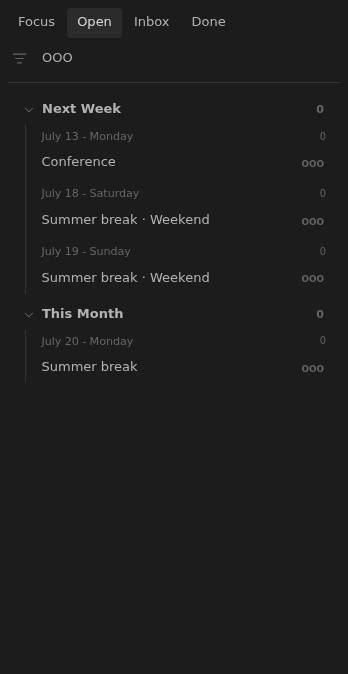
Section titled “What changes on the board”Open shows holiday and personal time-off markers from today through the latest next-action date among open notes. Focus shows today’s markers. With no dated open notes, there are no markers. OOO shows only these markers; selecting a normal context hides them.
When public holidays, personal time off, and weekly non-working days overlap, the marker lists all reasons. Ordinary non-working weekdays alone do not create markers.
A board row reports an availability conflict only when it falls on that note’s earliest unchecked due date. A conflict on a later task becomes visible when that date becomes the earliest. The date controls move by calendar days, so check the new date when rescheduling across time off.
Rules and details
Section titled “Rules and details”- The Tasks Eye settings tab lets users choose a Nager.Date country, configure non-working weekdays, and add, edit, or delete personal dates and inclusive ranges.
- No public-holiday country is selected by default; choosing one caches named nationwide public holidays for the current, next, and task-relevant years.
- The last good public-holiday cache remains active when a refresh fails or the user is offline.
- Personal entries may have an optional label and otherwise appear as
Vacation. - Focus and Open interleave named holiday and vacation markers with dated work, combining every reason when dates overlap without adding ordinary weekend markers.
- The
OOOfilter shows only availability markers. - Normal context filters suppress availability markers.
What it looks like
Section titled “What it looks like”Availability settings
Section titled “Availability settings”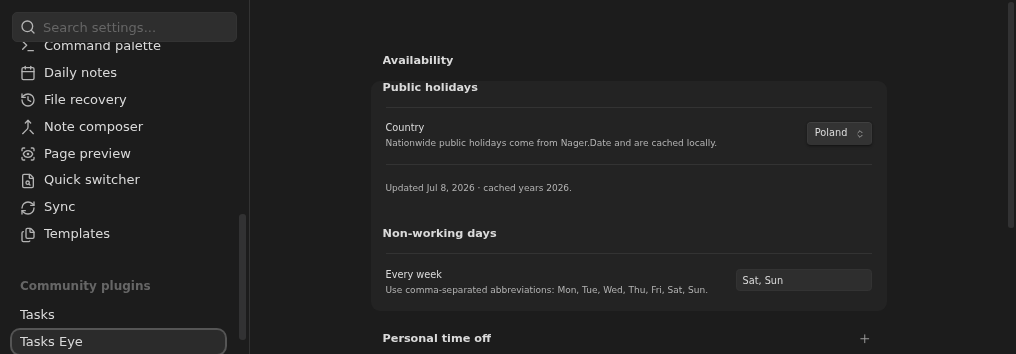
OOO filter
Section titled “OOO filter”