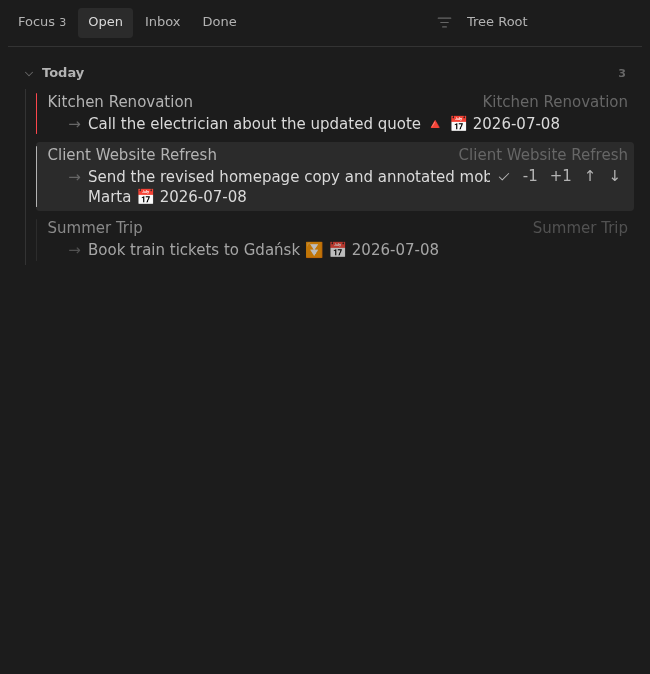
Complete, reschedule, and reprioritize tasks
Board rows can mark the next task done, move its due date, or nudge its priority without opening the note.
How to use it
Section titled “How to use it”Hover over a row or focus its controls to complete the selected task, move its date, or change its priority. Every action updates the task in the original note.
- Checkmark: complete the task through Tasks. Recurring tasks follow Tasks’ completion behavior.
- Date controls: move the due date by the displayed number of calendar days. They do not skip weekends, holidays, or personal time off.
- Priority arrows: move one step higher or lower. Priority changes ordering among notes whose next actions share a date.
Open the note when you need its supporting information or want to edit a different task. After completing the visible action, choose and date the next step if work remains.
Rules and details
Section titled “Rules and details”- Rows with an unchecked task show a mark-done button.
- Rows with a due date show
-1and+1due-date controls in that order. - Rows with an unchecked task show raise (
↑) and lower (↓) priority controls. - The raise button is disabled when the task is already at the highest priority, and the lower button is disabled when the task is already at the lowest priority.
- Moving a due date updates the matching Tasks due marker in the note.
- Raising or lowering priority updates the matching Tasks priority signifier in the note.
- Marking a task done uses Tasks to complete it, including its recurrence behavior, then refreshes the board.
What it looks like
Section titled “What it looks like”Act on the next task
Section titled “Act on the next task”