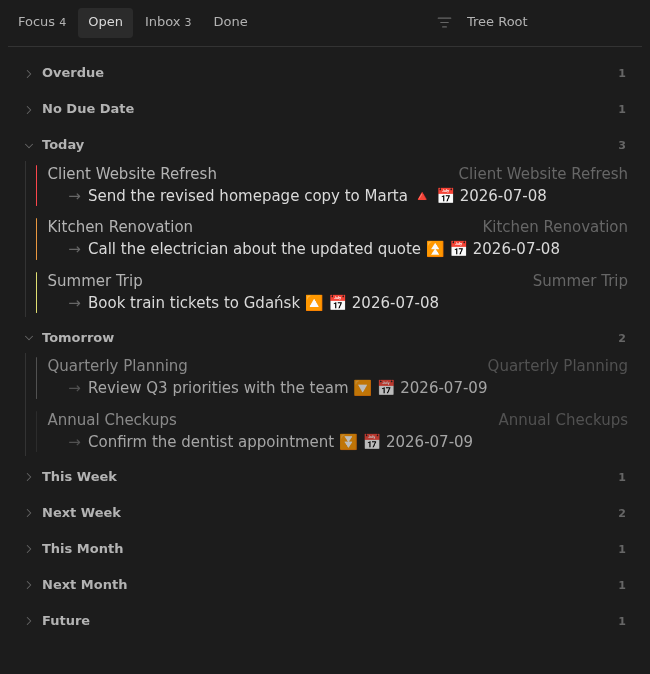
Open view
Open turns active notes into a dated view of their next actions, so you can see what needs attention now without losing the surrounding note context.
How to use it
Section titled “How to use it”A long task list can tell you everything you might do without helping you decide what deserves attention now. Open narrows that decision. It shows each active note through its next dated task and groups those notes by when they should surface.
Today opens first. Every other section stays collapsed until you want to inspect it. Overdue and undated work remain visible ahead of Today, while Tomorrow and Monday-to-Sunday week buckets keep near-term work from competing with the rest of the month. Each note appears only in the earliest matching section, and your expanded choices remain in place while the pane is open.
Scheduling stays in the Tasks due markers inside your Markdown. Moving work to another day changes the original task rather than creating a separate copy.
Rules and details
Section titled “Rules and details”- Notes with missing, blank, or explicit
status: openappear in Open. - Closed notes and notes with unsupported statuses do not appear in Open.
- Each row shows the unchecked task with the earliest due date. If none are dated, it shows the first unchecked task.
- Rows use the first matching Overdue, No Due Date, Today, Tomorrow, This Week, Next Week, This Month, Next Month, or Future bucket.
- Weeks run Monday through Sunday and take precedence over overlapping month buckets.
- A new Open pane starts with Today expanded and every other due-date bucket collapsed.
- Sections you expand or collapse keep that state across updates and tab switches until you close the pane.
What it looks like
Section titled “What it looks like”A lived-in Open board
Section titled “A lived-in Open board”