Focus view
Focus presents open work due today or overdue as one flat, note-centered daily list.
How to use it
Section titled “How to use it”Open keeps the full planning horizon visible, but daily execution needs a smaller surface. Focus combines Open’s Overdue and Today content and presents it as one flat list without bucket headers or day dividers.
The rows are deliberately the same rows used by Open. Completing, rescheduling, filtering, opening a note, and reading validation feedback should not change meaning when moving between the two views.
Dates first, then priorities
Section titled “Dates first, then priorities”Focus sorts by the next action’s due date, earliest first. Within the same date, higher-priority tasks come first; context and note title break further ties. The first row stays bright while later rows are dimmed to make it easier to choose a starting point.
Each row also has a priority accent on its left edge, from warm colors for high priority to faint grey for low priority. Low-priority rows are dimmer too. The priority symbol remains in the task text, so color is not the only cue.
Use your own judgment when choosing work: raising a task’s priority only changes its place among notes on the same date.
Rules and details
Section titled “Rules and details”- Focus is the first tab and opens by default when no valid saved view is available.
- Open notes whose earliest unchecked dated task is due today or overdue appear in Focus.
- Undated, future, closed, and unsupported-status notes do not appear in Focus.
- Focus uses the same note-first rows, actions, context filtering, availability markers, and validation messages as Open.
- Focus is a flat list, ordered by due date and then priority within each date.
- Rows show task priority: every row carries a left accent bar that ramps from urgent warm hues through neutral to faint greys, and below-normal rows are also de-emphasized.
- Focus keeps the first row sharp and dims every row below it so the eye rests on the single next action.
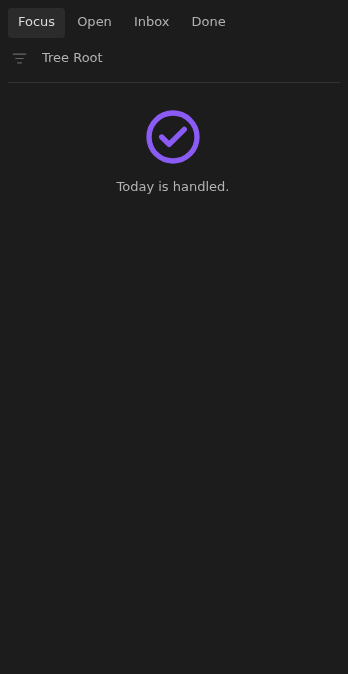
- An empty Focus view celebrates that
Today is handled.with a large check icon.
What it looks like
Section titled “What it looks like”Today’s focus
Section titled “Today’s focus”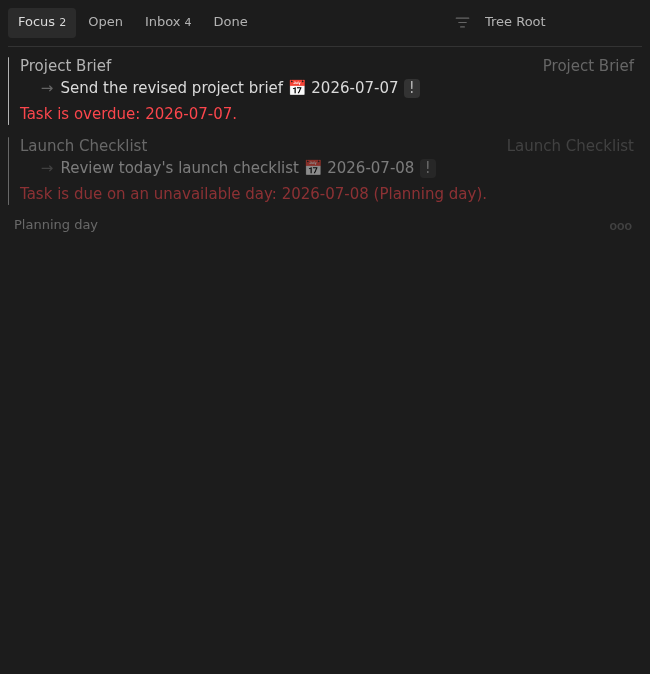
Priority accents with a clear starting point
Section titled “Priority accents with a clear starting point”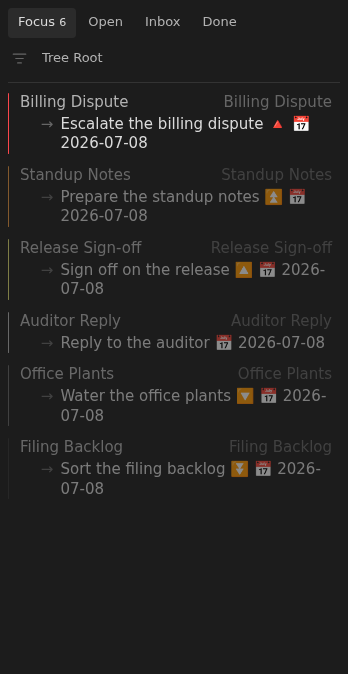
A completed day
Section titled “A completed day”